5-13 複数選択した項目を取得するリストボックス 2021.11.16
リストボックスで複数選択した値の取得には、SelectedプロパティとListプロパティを用います。
リストボックスで選択した行は、Selectedプロパティに配列として格納されます。
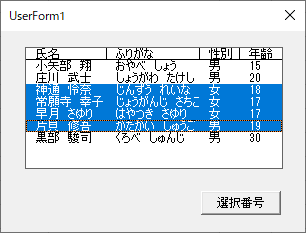
下図の例では、3番目~6番目の項目が選択されています。
Selectedプロパティの内部は次のようになります。
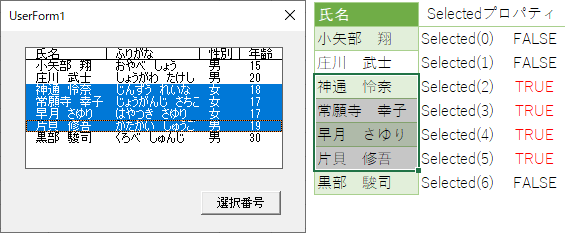
Selectedプロパティの配列を確認し「True」の場合は、Listプロパティを利用し値を取得します。
サンプルコード①
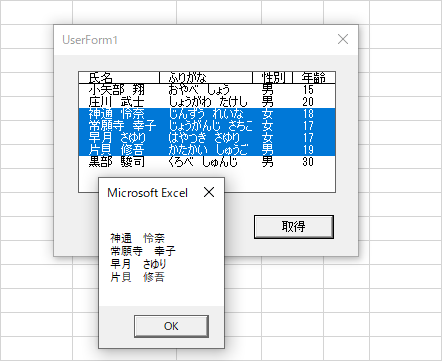
コマンドボタンをクリックすると、選択している行の値を取得する
Private Sub CommandButton1_Click()
    Dim i As Long, strValue As String
    With ListBox1
        For i = 0 To .ListCount - 1
            If .Selected(i) Then
                strValue = strValue & .List(i) & vbLf
            End If
        Next
    End With
    MsgBox strValue
End Sub
サンプルコード②
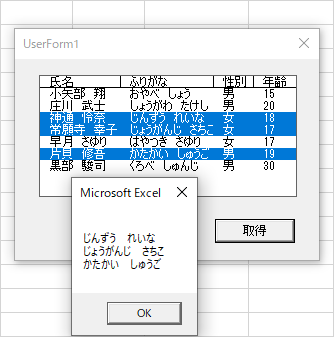
コマンドボタンをクリックすると、選択している行の2列目の値を取得する
Private Sub CommandButton1_Click()
    Dim i As Long, strValue As String
    With ListBox1
        For i = 0 To .ListCount - 1
            If .Selected(i) Then
                strValue = strValue & .List(i, 1) & vbLf
            End If
        Next
    End With
    MsgBox strValue
End Sub